AWS S3
Amazon Simple Storage Service (S3) is Amazon's Object Storage service that provides high availability, security, fault tolerance and cost optimizations for users to
store data. S3 can be used to store all types of data as objects, from data lakes or deep archives, to hosting static websites and rendering JavaScript/React, S3
use cases are pretty diverse, and because of this, S3 provides different storage classes to store your data based on the user's performance and pricing needs.
Storage Structure
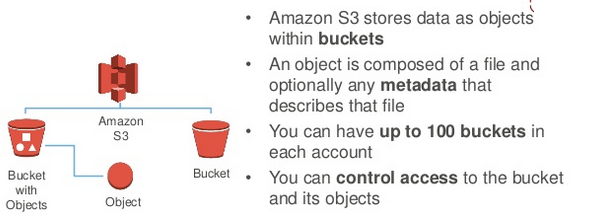
All objects under S3 are stored under logical units called buckets. Users may create multiple buckets, and each bucket can store multiple objects, and configured with different lifecycle and security policies. However, there are no standalone objects. Everything, from large repositories to a single file, must be stored under a bucket. It is considered best practice to store similar types of data under the same bucket, so that Access Management and Lifecycle configuration is easier. On top of buckets, users can also specify the level of access and security permissions for the bucket. For example, if you're storing private files, artifacts or confidential data that you want to deny unauthorized access to, you can configure the security policies of the particular bucket to deny any HTTP requests, configure it under a private subnet, and set up Access Control Lists(ACLs) to limit access to certain users within your AWS organization. At the same time, you can also have a bucket that hosts a static website, which is configured under a public network and accessible via HTTP requests. Similarly, Lifecycle policies, which facilitate the transfer of data between different storage classes can also be configured on a bucket level. In this manner, S3 buckets provide a decoupled and modular approach to configuring Access Management and Lifecycle Policies for different data. To learn about Access Management and Lifecycle policies, visit here Access Management and Lifecycle policies to learn more.
Storage classes
As mentioned before, S3 provides different storage classes for different types of data. The motivation behind doing so is the idea that data is heterogeneous. This means that different data have different needs when it comes to read/write operations, performance, and availability, and therefore should have different costs too. For example, archived backup data does not require the same level of availability and fault tolerance as does mission critical data, and so, the costs should also reflect the same. For this S3 provides different storage classes as per the following:
- S3 Standard: This is the Standard storage class which provides 99.99999% availability, fault tolerance and replication, and suited best for mission critical and live (frequent access) data.
- S3 Infrequent Access: AS the name suggests, this class is suitable for data that is infrequently accessed, therefore its availability is slightly lower, for the benefit of cheaper pricing.
- S3 Infrequent Access One Zone: To provide fault tolerance, S3 buckets are replicated across 3 different Aavailability Zones. However, for non-critical data like logs, this level of repl;ication is not required and possesses extra costs. Therefore One Zone can be used which provides lower cost at the expense of lower fault tolerance. 4.S3 Glacier Deep Archive: This storage class is suited best for data that is archival data, and therefore very infrequently accessed. The availability of the data is very low, and the retrieval times can be as high as hours, however, the costs for storing data are very cheap, so this is suited best for backups and logs.
- S3 Intelligent Tiering: This storage class constantly monitors the frequency of access to data, and automatically facilitates the transfer of data based on the frequency between different storage classes in order to optimize costs.
This list was by no means exhaustive, and there is no one fits all solution while choosing S3 Storage Classes. Different types of data have different needs, and to learn more about storage classes and pricing visit here S3 Storage Classes